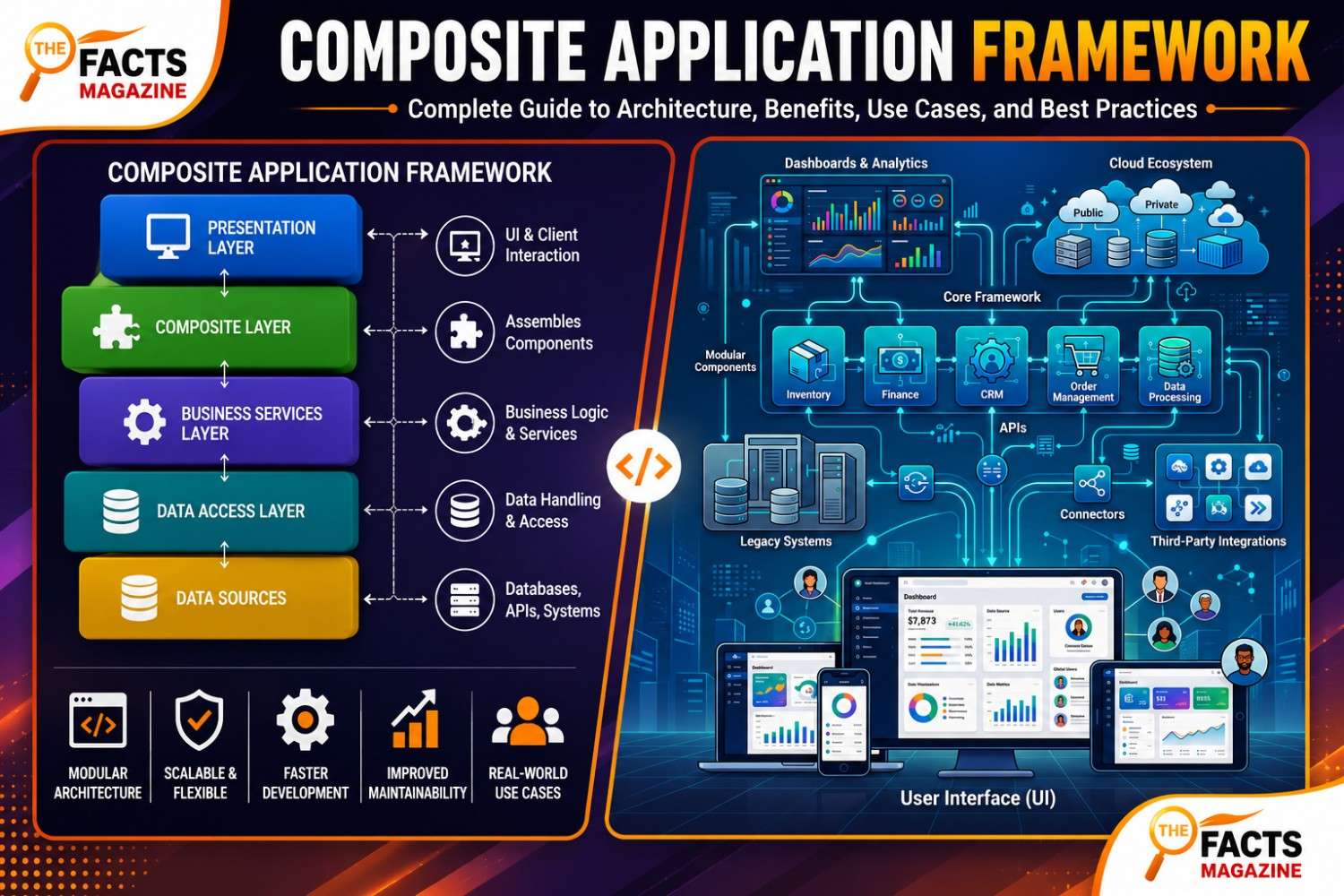
Here’s the thing about modern software: nobody builds everything from scratch anymore. Instead of coding every feature by hand, teams snap together pieces that already exist. That’s exactly where the Composite Application Framework shines. It lets you pull working parts from different systems and connect them into one smooth, unified product.
- What Is a Composite Application Framework?
- What Problem Does a Composite Application Framework Solve?
- How Composite Applications Work in Modern Enterprise Software
- Core Principles of Composite Application Framework
- Composite Application Framework vs Traditional Application Development
- Composite Application Framework vs SOA vs Microservices
- Key Components of a Composite Application Framework
- Technologies Used in Composite Application Frameworks
- Benefits of Composite Application Framework for Businesses
- Common Use Cases of Composite Application Framework
- Best Platforms and Tools for Composite Application Development
- Challenges and Limitations of Composite Application Framework
- Security Considerations in Composite Application Frameworks
- Best Practices for Implementing a Composite Application Framework
- The Future of Composite Application Frameworks
- Frequently Asked Questions About Composite Application Framework
If your business runs a mix of old and new software, this approach can save you months of work. Let’s break it all down in plain English.
What Is a Composite Application Framework?
A Composite Application Framework (often shortened to CAF) is a platform that gives developers the tools, interfaces, and runtime environment to combine pieces from separate applications into one working solution. Rather than rebuilding a feature, you reuse it. Those pieces might be a single function, a whole reporting module, or a web service from a totally different system.
What’s interesting is that CAF isn’t tied to one vendor. SAP built its own version inside NetWeaver. Oracle ships one for JD Edwards EnterpriseOne. IBM has WebSphere Portal. Each solves the same core problem — connecting scattered systems — in its own way.
|
Aspect |
Composite Application Framework |
Traditional Development |
|---|---|---|
|
Build approach |
Assemble pre-built, reusable components |
Code everything from scratch |
|
Build time |
Weeks to a few months |
Months to a year or more |
|
Reusability |
High — modules used across projects |
Low — mostly single-purpose code |
|
Best fit |
Connecting or modernizing systems |
New, standalone products |
|
Upfront cost |
Lower labor, possible licensing |
Higher development labor |
What Problem Does a Composite Application Framework Solve?
To be honest, most companies aren’t short on software. They’re drowning in it. A support team logs into a CRM, a billing tool, and a shipping tracker just to answer one customer. Data sits locked in silos. Nobody has time to rebuild it all.
A Composite Application Framework closes that gap. It unifies scattered systems, reduces data silos, and centralizes access — all without forcing a full rebuild. This matters more every year. Gartner projected IT spending on software to grow by 9.8%, and over 70% of enterprises are expected to lean on industry cloud platforms and composable approaches for digital transformation.
How Composite Applications Work in Modern Enterprise Software
Composite applications work by combining independent programs, data, and devices into a new solution that none of those pieces could deliver alone. Think of it like a modular kitchen — countertop from one supplier, cabinets from another, appliances from a third — yet the finished result feels unified and intentional.
The framework provides the glue: standardized communication protocols, shared authentication, consistent UI patterns, and governance rules. That way, all the moving parts play nicely together instead of fighting each other.
Also Read: When Is UStudioBytes Released? Date, Beta & Features
Core Principles of Composite Application Framework
Four ideas show up in nearly every Composite Application Framework, no matter the vendor. Get these and everything else clicks into place.
Modularity
Modularity breaks an app into smaller, independent parts. Each one handles a single job — billing, authentication, inventory lookups — and can be swapped or updated on its own. This is why teams can reuse modules across projects and slash development time.
Loose Coupling
Loosely coupled components don’t lean too heavily on each other. So when one module fails or gets replaced, the rest of the system keeps humming. Less downtime, easier updates, happier users.
Abstraction
Abstraction hides the messy details behind a clean interface. A developer calling a shipping module doesn’t need to know how it talks to a warehouse database three systems away. It simplifies integration and speeds up work.
Composition
Composition is the assembly step. You take those modular, loosely coupled, abstracted pieces and arrange them into a finished workflow. This is where reusable building blocks become a real, working application.
Composite Application Framework vs Traditional Application Development
Traditional development means writing custom code end to end. Every feature, every connection, built by hand. It’s reliable but slow — sometimes taking the better part of a year.
A Composite Application Framework flips that. You assemble existing modules, services, and functions into a new workflow. A common rule of thumb: build 70% from existing components and reserve custom work for the differentiating 30%. Release cycles shrink from months to weeks.
Neither is universally better. A brand-new consumer app with no legacy baggage has little reason to reach for CAF. But a company juggling a CRM, an ERP, and a decade-old inventory system? That’s exactly where this approach earns its place.
Composite Application Framework vs SOA vs Microservices
People mix these up all the time, so let’s clear it up. Service-Oriented Architecture (SOA) focuses on combining loosely connected services through shared protocols. Microservices break an app into tiny, independent services, each owning one business function.
A Composite Application Framework sits above both. It can run on top of SOA, microservices, or older middleware. What makes CAF different from a plain integration platform is intentionality — it doesn’t just connect systems, it provides the structure for building applications on top of those connections, including front-end composition and lifecycle tooling.
Key Components of a Composite Application Framework
Reusable Business Components
These are the heart of any framework — encapsulated units of business functionality complete with data contracts, UI fragments, and adapters. A solid “address validation” component drops into checkout, onboarding, or shipping without changes.
Integration Adapters and Connectors
No enterprise starts on a blank slate. Prebuilt connectors link to SAP, Salesforce, legacy mainframes, and homegrown databases. When one falls short, an adapter SDK lets teams build their own with consistent error handling and logging.
Unified User Experience Shell
The UX shell — sometimes called an application shell — handles navigation, shared authentication tokens, and visual consistency. Users see one coherent product, not a patchwork of screens stitched together.
Orchestration and Workflow Engine
Business processes rarely map to a single service call. An orchestration engine coordinates multi-step workflows, handles compensating transactions, and maintains state across long-running operations. Many use BPMN for visual workflow design.
Observability and Monitoring Tooling
When something breaks — and it will — you need to find it fast. Distributed tracing, centralized logging, and component health checks aren’t optional. They’re survival tools baked in from day one.
Technologies Used in Composite Application Frameworks
APIs and API Gateways
APIs are how systems talk. An API gateway sits in front of a group of services and controls who can call them, how often, and with what credentials. It’s the security checkpoint for your composite build.
REST, SOAP, JSON, and GraphQL
Most composite builds talk over REST APIs — lightweight and widely supported. Older banking and government systems often still rely on SOAP, a stricter messaging standard. Data usually travels as JSON, which both humans and machines read easily. GraphQL adds flexible querying on top.
Middleware, ESB, and Message Queues
Middleware sits between applications and moves data around. An Enterprise Service Bus (ESB) is a specific type that routes messages using shared rules. For real-time work at scale, message queues like Kafka or JMS let one system drop off a message and move on.
Event-Driven and Request-Driven Communication
Request-driven models are simple — one service calls another directly. Event-driven models let components publish and subscribe asynchronously, which makes systems more resilient. Mature frameworks support both, so teams pick per integration.
Benefits of Composite Application Framework for Businesses
This is where things get exciting! A Composite Application Framework delivers real, measurable wins:
- Faster time-to-market — assemble most of an app from existing parts and ship in weeks, not quarters.
- Reduced development costs — reuse eliminates redundant work and lowers the testing burden.
- Seamless legacy integration — connect old ERP and CRM systems with cloud-native microservices.
- Scalability and flexibility — add or upgrade modules without touching the whole system.
- Better user experience — one unified interface instead of endless logins.
- Support for digital transformation — plug in AI, IoT, and analytics as you grow.
For CTOs and CIOs, it means modernizing without disruption. For developers, faster delivery and reusable code. For business leaders, quicker innovation and a real competitive edge.
Common Use Cases of Composite Application Framework
Customer Dashboards
A support team pulls ticket data, account history, and payment status into a single screen — no more juggling three separate tools. Clean, fast, and easy.
Legacy System Modernization
Running a twenty-year-old inventory system? You don’t have to replace it. A composite build wraps it in a modern interface while the old backend keeps doing its job underneath.
Cross-Department Workflows
HR, finance, and operations often work from data trapped in separate silos. A composite build pulls the relevant pieces from each into one process — without merging the underlying databases.
Customer Support and Ticketing
Give agents access to tickets, complaints, and status updates in one connected hub. They resolve issues quickly, and customers feel the difference.
Healthcare and Regulated Industry Systems
Diagnostic networks running dozens of labs have used composition platforms to connect testing devices directly to electronic health records — cutting projects that once took the better part of a year down to a few months. In compliance-heavy industries, that’s huge.
Also Read: SimplifyDiggs com: Complete Guide to Features, Benefits, Uses, and Digital Insights
Best Platforms and Tools for Composite Application Development
SAP
SAP built its Composite Application Framework tightly into NetWeaver, with tools like SAP Cloud Platform, SAP HANA, and the SAP Application Integration Framework (AIF) for connecting non-SAP systems.
Oracle CafeOne
Oracle’s framework for JD Edwards EnterpriseOne lets authorized users embed external web content, multiple EnterpriseOne forms, and OBIEE objects into a single browser window. It’s informally called CafeOne.
MuleSoft
MuleSoft Anypoint Platform trades some flexibility for a guided, visual experience. Great for large enterprises wanting a managed platform without a deep bench of integration specialists.
Apache Camel
Open-source and Java-based, Apache Camel is built around Enterprise Integration Patterns. Perfect for teams wanting full control and zero licensing cost.
Spring Integration
If your team already lives inside the Spring ecosystem, Spring Integration is a low-friction, open-source choice that follows the same patterns as Camel.
IBM WebSphere Portal
IBM’s take acts as a workspace where separate applications and data feeds show up in one interface — solid for enterprises standardized on IBM middleware.
Microsoft Power Platform
A friendly, low-code option that lets business users assemble apps from pre-approved components, with developers stepping in only for complex logic.
Challenges and Limitations of Composite Application Framework
No approach is perfect, and it’s fair to know the trade-offs before committing.
- Dependency risk — if a composite app pulls from three external services and one goes down, the workflow can break. Plan fallbacks.
- Debugging complexity — tracing a failure across five sources takes longer than debugging a single codebase.
- Version drift — connected systems change on their own schedules, so ongoing maintenance is a must.
- Performance overhead — every action fanning out into multiple calls can add latency. Caching and batching help.
- Organizational resistance — teams used to full-stack ownership may bristle at shared components.
Also Read: 81x86x77: Meaning, Uses, Dimensions, and Possible Applications Explained
Security Considerations in Composite Application Frameworks
Every connected source is another point where data crosses a boundary. That means each one needs its own guardrails. Strong authentication and authorization, usually through Role-Based Access Control (RBAC) and Multi-Factor Authentication (MFA), keep the wrong people out.
Encrypt data both in transit and at rest. Follow secure coding practices to block SQL injection and cross-site scripting (XSS). And run regular audits, vulnerability assessments, and penetration tests. The API gateway does a lot of heavy lifting here, enforcing access control at the edge.
Best Practices for Implementing a Composite Application Framework
Getting started is easier than you think. Follow these and you’ll avoid the common traps:
- Start with a narrow, high-value scope. Pick one workflow — a single dashboard — before trying to connect everything.
- Invest in component governance. A component library without ownership becomes a junk drawer. Set clear versioning and deprecation policies.
- Design for failure at every boundary. Use circuit breakers, retry policies with exponential backoff, and graceful degradation.
- Prioritize developer experience. Clear docs, sandboxes, and CLI tooling keep teams using the framework instead of routing around it.
- Align teams with architecture. Conway’s Law is real — composable software needs cross-functional teams organized around business capabilities.
- Add an API gateway and monitoring early. Security and visibility are far easier to build in than to retrofit.
The Future of Composite Application Frameworks
The direction here is clear and, honestly, pretty exciting. The composable applications market is projected to jump from $6.44 billion in 2024 to $31.50 billion by 2034, expanding at a 17.20% CAGR. That’s explosive growth.
Low-Code and No-Code CAF
Low-code and no-code platforms are converging with composite frameworks fast. The low-code market alone is projected to grow from $28.75 billion in 2024 to $264.40 billion by 2032 at a 32.2% CAGR. Business users will assemble apps visually, with developers handling only the tricky bits.
AI-Powered Component Recommendations
AI is stepping in to recommend components, automate workflow optimization, and enable predictive scaling. Static component libraries are turning into dynamic, self-optimizing systems that learn and improve.
Framework Marketplaces and Enterprise Ecosystems
Framework marketplaces are evolving into full ecosystems — pre-built components, industry-specific solutions, and regulatory compliance packages ready to go. Enterprise ecosystems will let suppliers, partners, and customers share data and workflows in real time.
Frequently Asked Questions About Composite Application Framework
What is a composite application framework?
It’s a platform that gives developers tools, abstractions, and a runtime environment to build software by assembling modular, reusable components instead of coding everything from scratch.
What are composite applications?
Applications created by combining independent programs, data, and services into a new solution that delivers something the individual pieces couldn’t on their own.
What problem does a composite application framework solve?
It connects scattered, disconnected systems, reduces data silos, and modernizes legacy software — all without a costly full rebuild.
How does a composite application framework work?
It uses standardized APIs, shared authentication, and orchestration to combine functions from different systems into one unified workflow.
What are the benefits of composite application frameworks?
Faster time-to-market, lower development costs, seamless legacy integration, scalability, and a better user experience.
How is it different from traditional development?
Traditional builds start from scratch. A composite application framework assembles existing modules, cutting build time from months to weeks.
Is it the same as microservices?
No. Microservices are an architecture style. CAF can run on top of microservices, SOA, or older middleware — it’s the reuse and composition layer above them.
What’s the difference between an ESB and an API gateway?
An ESB routes and transforms messages between internal systems. An API gateway sits at the edge, controlling external access, authentication, and rate limits.
Can small businesses use a composite application framework?
Yes! Usually through low-code or no-code tools rather than custom-built connectors, which keeps the technical overhead manageable.
What are the best practices for implementing one?
Start small, invest in component governance, design for failure, and build in monitoring and an API gateway from day one.
What tools are used in composite application development?
Popular options include SAP, Oracle CafeOne, MuleSoft, Apache Camel, Spring Integration, IBM WebSphere Portal, and Microsoft Power Platform.
How does it support digital transformation?
It bridges legacy and modern systems and makes it easy to plug in AI, IoT, and analytics as needs evolve.
What are the challenges of composite applications?
Dependency risk, debugging complexity, version drift, and performance overhead — all manageable with good planning.
How secure is a composite application framework?
As secure as you build it. With RBAC, MFA, encryption, secure coding, and regular audits, a composite application framework can meet strict compliance standards.
For More information visit The Facts Magazine